Sybil Review
The anti-fraud review queue: how Onsend scores users, holds or blocks rewards, and how you approve or reject flagged accounts.
Onsend's anti-sybil system protects your campaign from farmers, the people who spin up many wallets to drain rewards. It watches the signals each user generates, rolls them into a trust score, and, based on a configurable sensitivity level (MEDIUM by default), quietly lets honest users through while holding rewards from suspicious accounts and blocking the clear sybils. Anything ambiguous lands in the Sybil Review queue for you to decide.
Score
Every user gets a 0–100 trust score built from behavioral, device, and on-chain signals. Higher is more trusted.
Act
The score maps to an action (allow, hold, or block) based on your tenant's sensitivity level.
Review
Held and blocked users surface in a priority-sorted queue where you approve or reject each one.
End users never see their score
The trust score is an internal signal. It's never shown on the leaderboard, the profile, or any public surface, and there's no number a user can game toward. They only ever experience the outcome (rewards land, are held, or access is refused).
How scoring works
Every user starts at a baseline score of 50 (neutral). As they act, whether signing in, verifying quests, getting referred, or linking socials, Onsend records signals. At score time each signal nudges the number up (more trusted) or down (more suspicious). The final score is clamped to 0–100.
Two things shape each signal's pull:
- Confidence: weak or spoofable signals (e.g. user-agent strings) count for less than hard ones.
- Age decay: signals fade so a user is judged on recent behavior. A signal younger than 90 days counts in full; 90–180 days counts at half; older than 180 days counts at a quarter.
The score is recomputed automatically whenever new signals arrive (sign-in, quest verify, social link) and on a weekly background sweep. You don't manage this; it just runs.
The signals that feed the score
| Signal source | What it watches | Effect |
|---|---|---|
| Signup | First wallet sign-in: IP, user-agent, device fingerprint | Establishes a baseline; clean residential signals nudge up |
| Quest verify | IP + device fingerprint captured on each verification | Reused devices/IPs across wallets pull down |
| Referral attribution | The referral graph: who invited whom, from where | Self-referral / suspicious chains pull down |
| Social link | Linking Twitter / Discord / Telegram | An established account nudges up; a throwaway pulls down |
| Account dedup | The same social account linked from a different wallet in your tenant | Strong negative; a classic multi-wallet tell |
| IP intelligence | ASN, datacenter, and VPN flags on the user's IP | Residential nudges up; datacenter / VPN pull down |
| Device fingerprint | Browser/device identity, matched across wallets | Unique device nudges up; one fingerprint serving many wallets pulls down |
IP privacy
Raw IPs are retained only briefly and then hashed for GDPR. IP intelligence (ASN / datacenter / VPN) requires a geolocation provider to be configured for your deployment. Without it, the IP layer simply contributes no signal and the score still computes from everything else.
Cross-tenant network signals (opt-in)
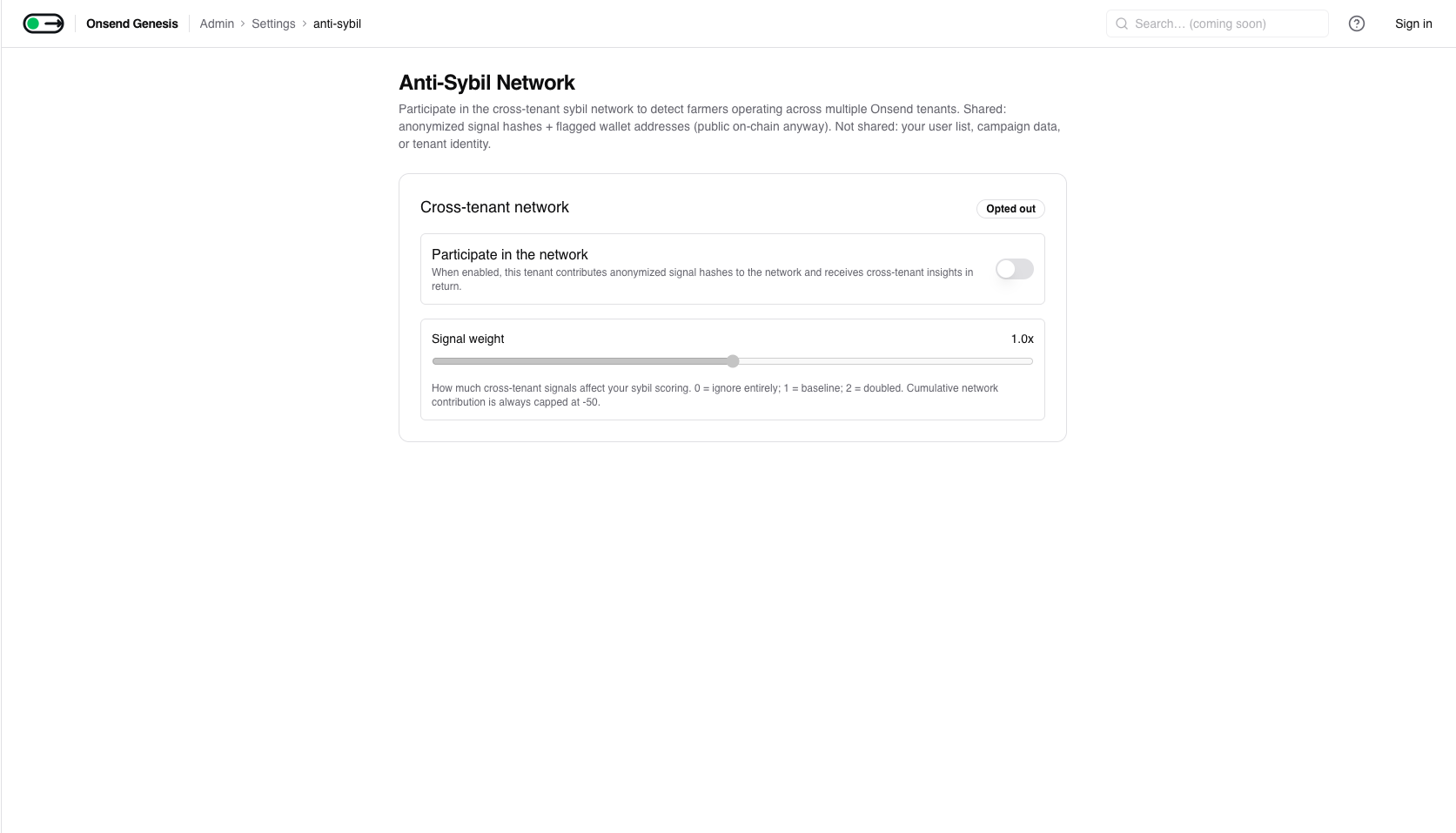
If you opt into the cross-tenant network (see Network settings), the score also factors in patterns seen across other Onsend tenants: a wallet flagged on several projects, a device fingerprint or IP tied to many wallets network-wide, or a social handle reused across wallets. Only anonymized hashes (and wallet addresses, which are public on-chain anyway) are shared; no user lists, campaign data, or tenant identities cross the boundary. The cumulative network contribution to any one score is capped, so cross-tenant signals are strong but never the sole reason a user is flagged. Participation is symmetric: opt out and you neither contribute signals nor receive insights.
Statistical anomaly detection
A set of statistical detectors runs daily over your tenant and watches for patterns no single user's signals would reveal: bursts of signups, suspiciously uniform quest-completion timing, referral-velocity spikes, clusters of same-age wallets, geographic concentration, and low behavioral entropy. When a detector fires, the affected users get an anomaly signal that feeds their score (capped so it can never dominate). A CRITICAL-severity anomaly also auto-creates review-queue items for the affected users; lower severities flag them but leave the decision to you.
Sensitivity levels and actions
Your tenant's sensitivity level (LOW, MEDIUM, or HIGH) decides where
the score breakpoints sit. The same score is treated more or less harshly
depending on the level. Every tenant runs at MEDIUM out of the box, and
the anti-sybil system is fully active at that level: scoring, holding and
blocking all work today.
Changing the level is support-assisted today; selector coming soon
Anti-sybil runs at MEDIUM by default and is working as described below.
Switching to LOW or HIGH, or overriding the individual score breakpoints,
is set by Onsend on request right now. There isn't yet a self-serve
control for it in the dashboard Coming soon. The behaviour of each level
(below) is real; only the in-product knob to flip between them is still on the
way. Email support@onsend.com to change your level (for example, to raise
it to HIGH ahead of a TGE).
A score resolves to one of four internal bands, and each band maps to an action:
| Band | Action | What happens |
|---|---|---|
| Trusted | allow | Full participation; rewards apply immediately |
| Neutral | allow (logged) | Participates normally; activity is logged but not acted on |
| Suspicious | hold | Participates, but XP is withheld until an admin approves |
| Blocked | block | Access is refused: signup / verify / attribution rejected |
The sensitivity level shifts the lines between these bands:
| Level | Use it when | Effect |
|---|---|---|
| LOW | Low-stakes / always-on campaigns | Loose: only the clearest sybils are held or blocked; most users feel zero friction |
| MEDIUM (default) | Most campaigns | Balanced breakpoints |
| HIGH | TGE windows, high-value reward pools | Conservative: users mostly reach Trusted only with positive signals |
HIGH adds friction, so request it deliberately
At HIGH, more legitimate users land in the Suspicious band and have their XP
held, which means more manual review for your team. It's the right call for a
token-generation event; it's overkill for a casual community campaign. Since
the level is support-assisted today, ask for HIGH ahead of the window you
need it for, and ask to drop back to MEDIUM afterward.
Held vs. blocked: the operator decision
The difference between hold and block is the difference between "wait and see" and "no", and it changes what you do about it.
Held (Suspicious)
The user keeps participating: they can verify quests and appear on the leaderboard. But the XP they earn is withheld: it does not count toward their totals or the campaign leaderboard. Behind the scenes each held completion records the real amount as pending, so nothing is lost, it's just parked.
Your decision: review the user and either approve (release every held reward into their totals) or reject (confirm sybil, so the held rewards are discarded and the user is blocked).
Blocked
The user is refused access: signup, quest verification, and referral attribution are all rejected. A blocked signup also opens an URGENT review item so you see it immediately.
Your decision: approve to clear the block and let them in (releasing any held rewards too), or reject to confirm the block stands.
Sybil-block is separate from a manual ban
A score-driven block and an admin's manual ban are independent. Approving a user in the review queue clears the sybil block; it does not touch a manual ban, and vice-versa.
The Sybil Review queue
Open Sybil Review in the admin sidebar. The sidebar row carries a badge with the current pending count (polled every 30 seconds) so you always know when there's work waiting.
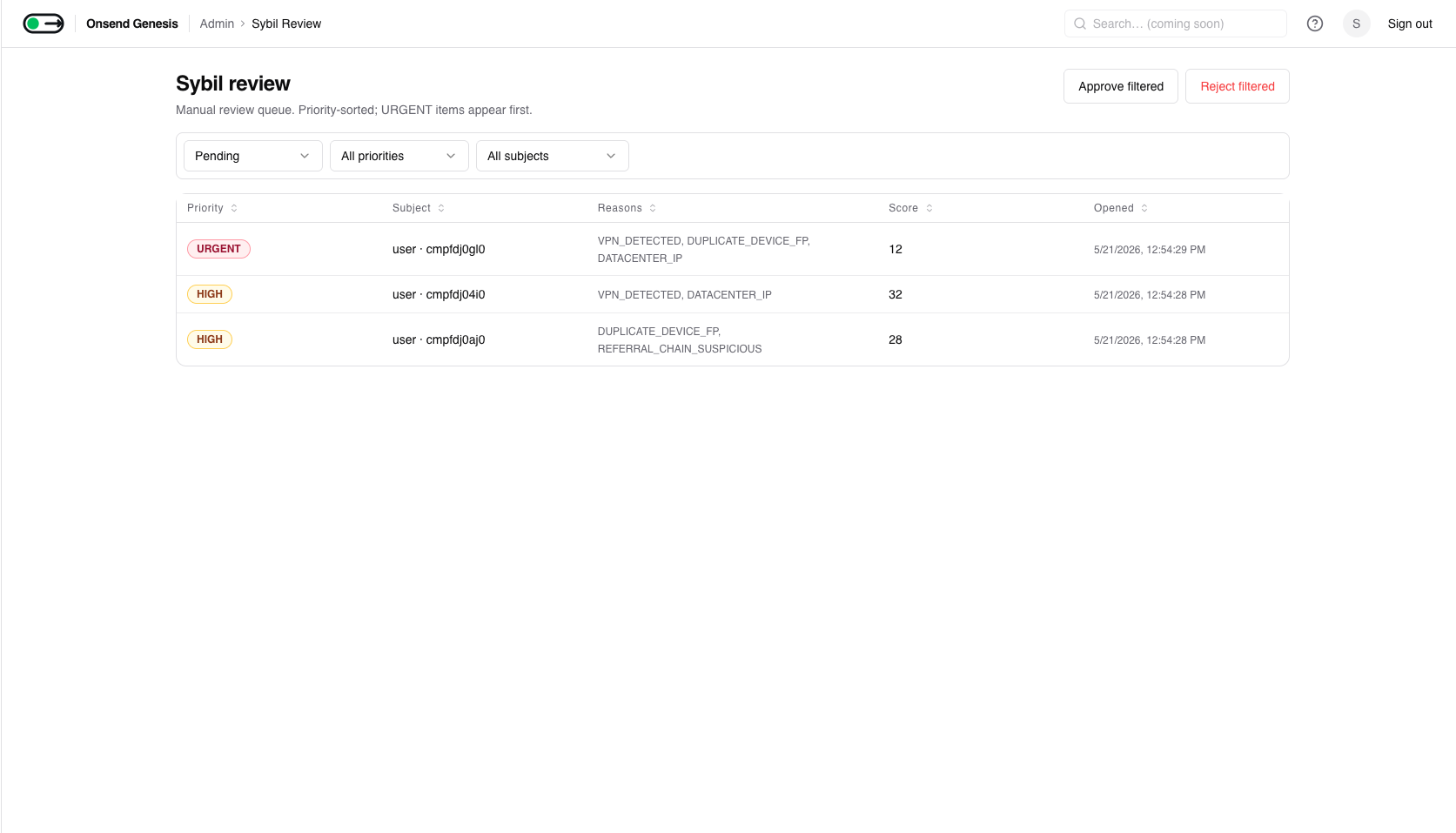
The queue is priority-sorted, URGENT items first. Each row shows the subject, the flag reasons, the triggering score, and when it was opened.
Three kinds of subject land here:
| Subject | When it's created | Default priority |
|---|---|---|
| User | A signup (or anomaly) is blocked / held | URGENT |
| Quest completion | A single held quest reward needs a decision | Normal |
| Referral | A referral was rejected for sybil reasons | Low |
Filter by status (Pending / In review / Resolved / Auto-resolved), priority, and subject type. The filter bar also drives Approve filtered / Reject filtered for clearing a whole filtered set at once.
Borderline users can clear themselves
A daily background sweep auto-resolves a queued user whose score has since recovered above the suspicious line, releasing any held rewards and marking the item Auto-resolved. You don't have to chase users who flagged once and then behaved.
Reviewing an item
Click any row to open its detail page. For a user subject you'll see the flag reasons and the recent signals that drove the score (signal type, value, source, and confidence) so you can judge whether the flag is real.
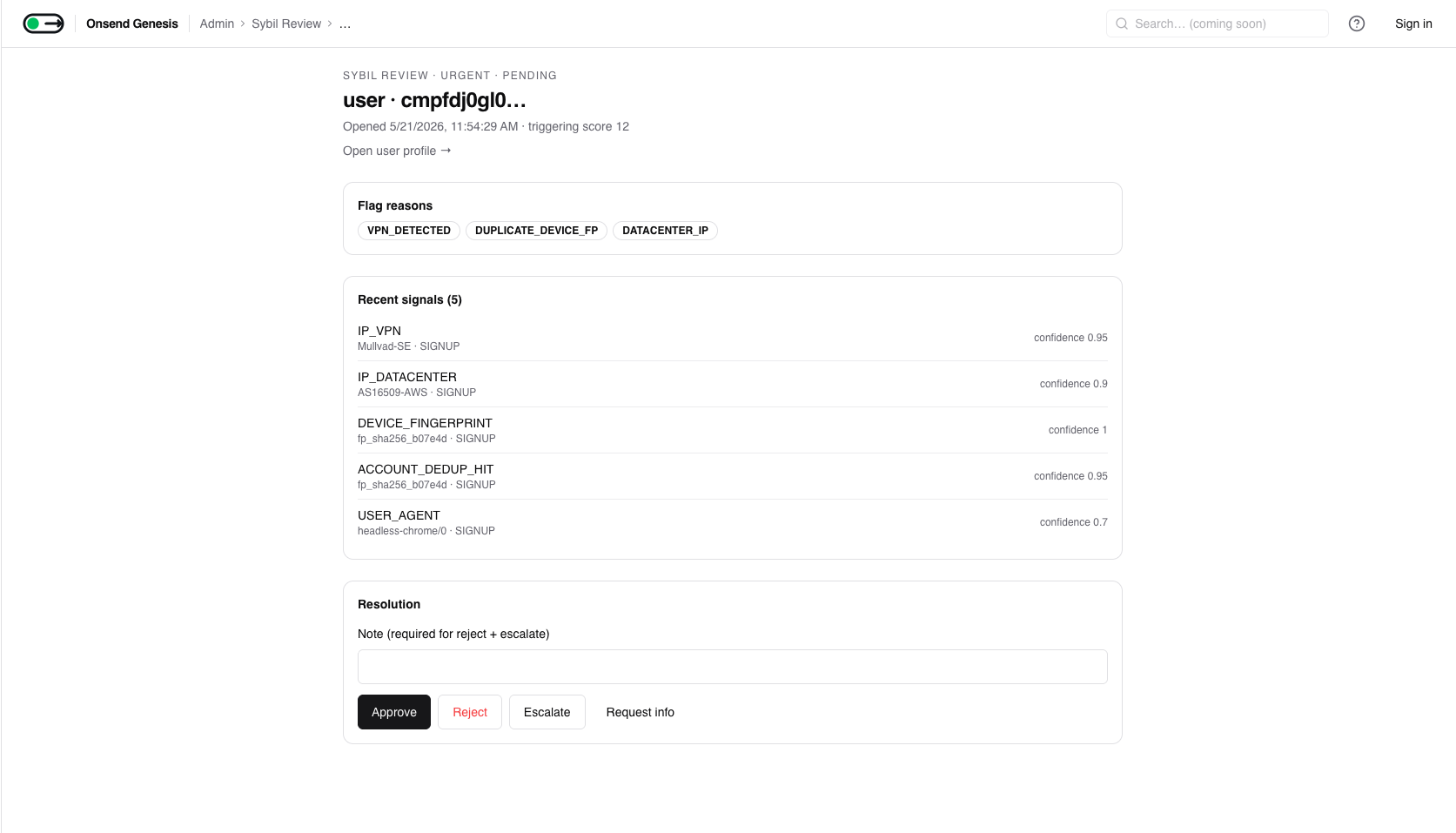
Four actions are available on a pending item:
| Action | What it does | Note required |
|---|---|---|
| Approve | Clears the flag; for a user, releases all held XP into their totals and unblocks them. For a single completion, releases just that reward. For a referral, sets it back to Pending. | No |
| Reject | Confirms sybil. Held completions are revoked, the user is blocked, a referral is marked Rejected. | Yes (min 4 chars) |
| Escalate | Bumps the item's priority and leaves it in the queue, flagging it for a teammate without resolving. | Yes (min 4 chars) |
| Request info | Moves the item to In review at low priority, so you can park it while you gather more context. | No |
Approve and Reject are not undoable
Approve releases held XP and unblocks; Reject revokes held rewards and blocks. Both write through immediately and adjust user totals, and there's no undo. The bulk Approve filtered / Reject filtered actions apply the same treatment to every item in the current filter at once.
Every resolution is recorded against the acting admin with an optional note, and writes to the audit log.
Settings
Sensitivity & thresholds Coming soon
Sensitivity is held per tenant as the antiSybilLevel (LOW / MEDIUM /
HIGH), with optional per-tenant overrides of the individual score breakpoints
(trusted / neutral / suspicious) for fine-tuning. Every tenant runs at
MEDIUM today and the system is fully active there.
Coming soon: no self-serve control yet
There isn't yet a dashboard control to change the sensitivity level or the score breakpoints; both are set by Onsend on request for now. Email support@onsend.com to adjust them (a self-serve selector is on the way). This is the only support-assisted knob in the anti-sybil system; everything else on this page is live and operator-controlled.
Network settings
Cross-tenant network participation is managed in-product, under Settings → Anti-Sybil. There you toggle participation, tune how much weight cross-tenant signals carry (0× to 2×), and can leave the network entirely.
Threshold edits are non-destructive
Changing the sensitivity level or a threshold only changes how future scores are interpreted; it doesn't rewrite history. Scores recompute on the next signal or the next scheduled sweep.
Tips
- You're at MEDIUM by default. Ask Onsend to move you to
HIGHonly for a TGE or a high-value pool (the self-serve selector is coming soon), and expect more held rewards (and more review work) when you do. - Read the signals before you reject. The detail page shows exactly why a user was flagged: an established Twitter account and a residential IP usually mean a false positive worth approving.
- Let the auto-resolve sweep work. Don't rush borderline users; many clear themselves once they keep behaving.
- Opt into the network for TGEs. Cross-tenant signals catch farmers who've already been flagged on other projects, exactly the wallets a high-value airdrop attracts.