Leaderboard, XP, Tiers, Badges & Squads
How ranking works, covering XP and multipliers, the per-campaign tier ladder, built-in and custom badges, and squad team-up mechanics.
The leaderboard is where everything your community does shows up as rank. Every verified quest completion awards XP; XP rolls up per campaign to drive rank and a tier ladder; badges recognise milestones; and squads let members team up for collective bonuses. This page explains how each piece works and what you, as an admin, control.
XP & rank
Verified quests award XP. XP rolls up per campaign and orders the leaderboard.
Tiers & badges
A per-campaign tier ladder (Bronze → Platinum) plus built-in and custom badges.
Squads
Members team up; collective quests reward the whole squad with an anti-sybil gate at formation.
Leaderboard
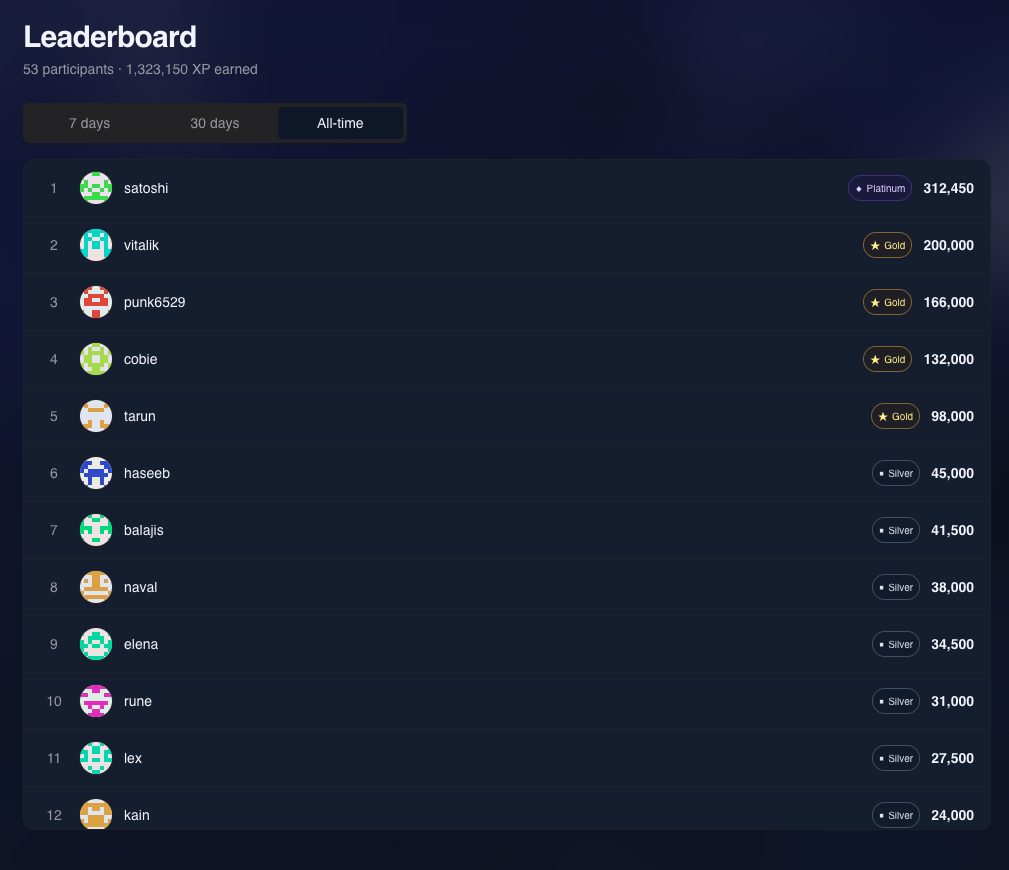
The leaderboard ranks participants within a campaign by their campaign XP, highest first. Each row shows the member, their XP, rank and tier. A signed-in end user always sees their own "sticky" row even when they're far down the list.
Time windows
The public leaderboard accepts a window parameter so members can see ranking
over different time spans:
| Window | Meaning |
|---|---|
all (default) | All-time campaign XP |
7d | Last 7 days |
30d | Last 30 days |
campaign | Bounded to the campaign's start/end dates |
The legacy aliases week (→ 7d) and month (→ 30d) are still accepted for
backward compatibility.
How windowed ranking is built
All-time ranking reads directly from each member's live campaign XP. The 7d / 30d / campaign windows are pre-computed once a day (a rollup worker runs at 02:30 UTC) so the page loads fast at any scale. On a brand-new campaign (before that worker has run) windowed views fall back to all-time so the leaderboard never renders empty.
How rank is computed and cached
Rank is the count of members with more campaign XP, ordered consistently so ties never shuffle between page loads (XP descending, then a stable tiebreak). To keep the "your rank" lookup fast on large campaigns, each member's rank is cached and refreshed continuously, with a nightly correction pass. The leaderboard is read-only for admins; it reflects whatever XP your quests have awarded.
XP
There are two XP figures, and the distinction matters:
- Total XP: a member's lifetime XP across everything in your project.
- Campaign XP: XP earned within a single campaign. This is the number the leaderboard ranks on, and the number the tier ladder reads.
XP is only ever awarded through a verified quest completion, never edited by hand on the leaderboard. (Admins can still make manual XP adjustments from a user's detail page; those flow through the same award path.)
Multipliers compound on the award
When a member has active multipliers (referral bonuses, streak bonuses, etc.), they compound on top of the quest's base XP at award time. A quest worth 100 XP awarded to a member with a 1.3× streak multiplier credits 130 XP. The base amount is the quest's configured value (or, for connectors like daily check-in and Mystery Box, a per-user override); multipliers always layer on top of that base.
Tiers
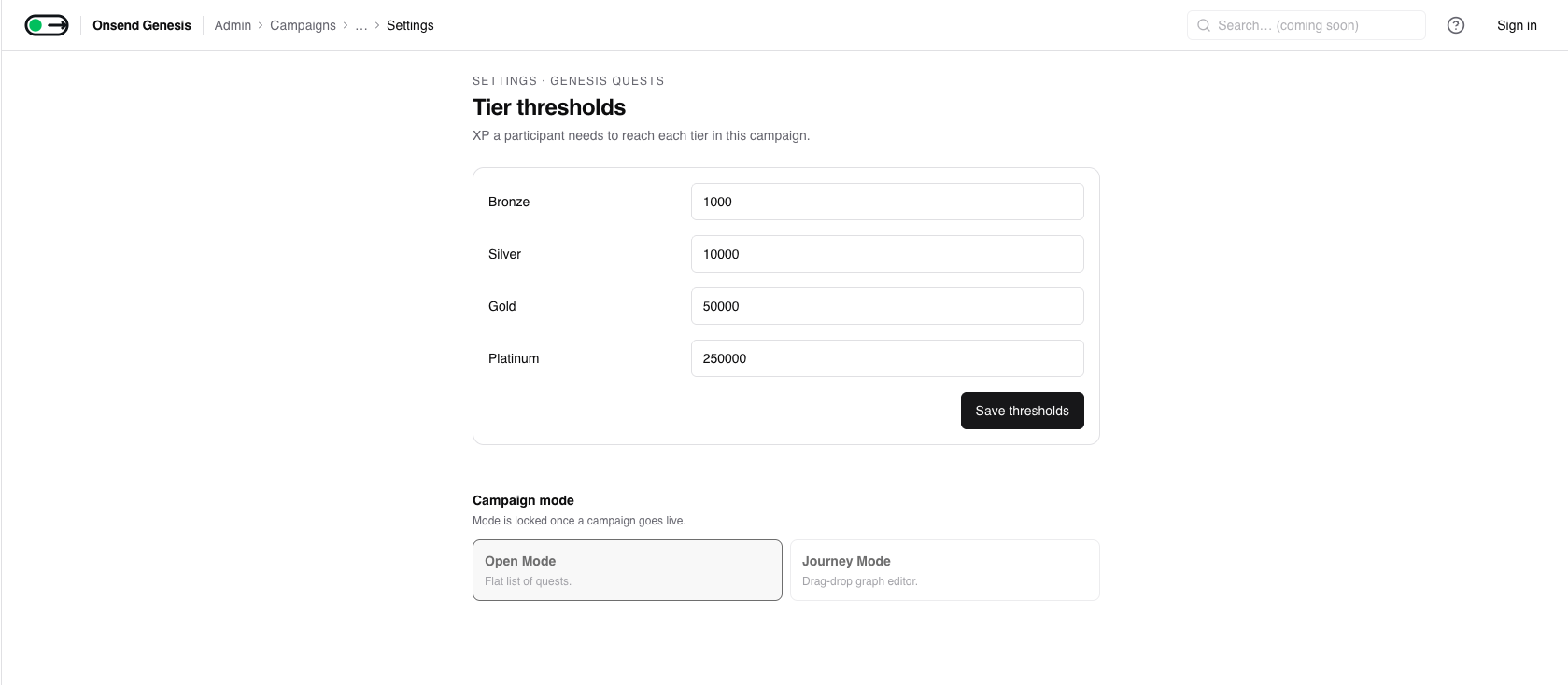
Each campaign has a four-rung tier ladder driven by campaign XP. Tiers are per campaign, so a member can be Gold in one campaign and unranked in another. Hitting a threshold exactly grants that tier.
The defaults written into every new campaign:
| Tier | Campaign XP threshold |
|---|---|
NONE | below 1,000 |
BRONZE | 1,000 |
SILVER | 10,000 |
GOLD | 50,000 |
PLATINUM | 250,000 |
Thresholds are stored per campaign, so you can raise or lower them to fit a shorter or longer campaign. A member's tier recomputes automatically whenever their campaign XP changes; lowering thresholds later can promote members on the next recompute, raising them can demote.
Badges
Badges are persistent recognitions on a member's profile. Each badge has a
tier (STANDARD, RARE, EPIC or LEGENDARY) used for display. Badges
also feed the reputation score (see below).
More on badges
This section covers the basics. The progression layer (progress bars, collectible sets with completion perks, prestige tiers, and managing your custom badge types) lives in Badges, Sets & Prestige.
Built-in badges
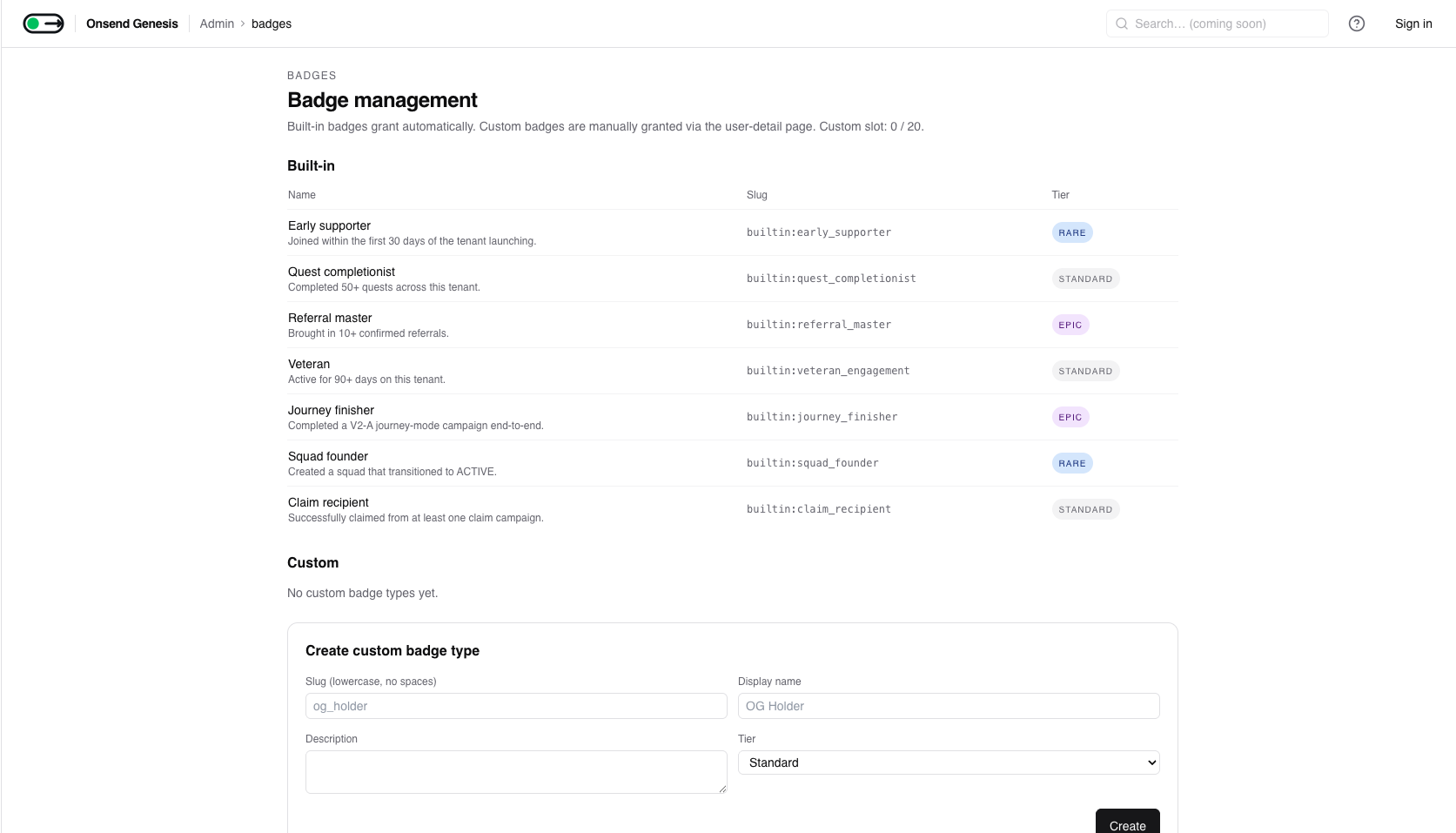
Seven built-in badges ship with every project and are granted automatically by a daily evaluation worker. You don't configure these; they're awarded the moment a member qualifies:
| Badge | Tier | Awarded when |
|---|---|---|
| Early supporter | Rare | Joined within the first 30 days of your project launching |
| Quest completionist | Standard | Completed 50+ quests across your project |
| Referral master | Epic | Brought in 10+ confirmed referrals |
| Veteran | Standard | Active for 90+ days |
| Journey finisher | Epic | Completed a Journey-mode campaign end-to-end |
| Squad founder | Rare | Created a squad that reached ACTIVE |
| Claim recipient | Standard | Successfully claimed from a claim campaign |
Custom badges
You can define your own badge types from Badge management: set a slug, display name, description, icon and tier. Custom badges can then be granted to members manually from a user's detail page.
Custom badge cap
Each project may define up to 20 custom badge types. Enterprise plans
are uncapped. Built-in badges do not count toward this cap. The builtin:
slug prefix is reserved.
Revoking a badge is a soft action: the badge is tombstoned, history is retained, and reputation stops counting it.
Squads
Squads let members band together within a campaign and earn collective
rewards. A squad has a leader, a roster, a join policy (OPEN, INVITE_ONLY or
CLOSED), and progresses through a short lifecycle.
Lifecycle: FORMING → ACTIVE → ARCHIVED
FORMING
A newly created squad starts in FORMING. It's recruiting members and can't yet
earn collective rewards. A squad must reach its minimum size to be promoted.
ACTIVE
Once a squad hits the minimum member count it's promoted to ACTIVE, provided
it passes the anti-sybil density gate (below). Only ACTIVE squads can complete
collective quests and appear in squad XP rankings.
ARCHIVED
Squads that never reach minimum size are auto-archived after a 7-day grace period. Admins can also dissolve a squad directly.
Size limits
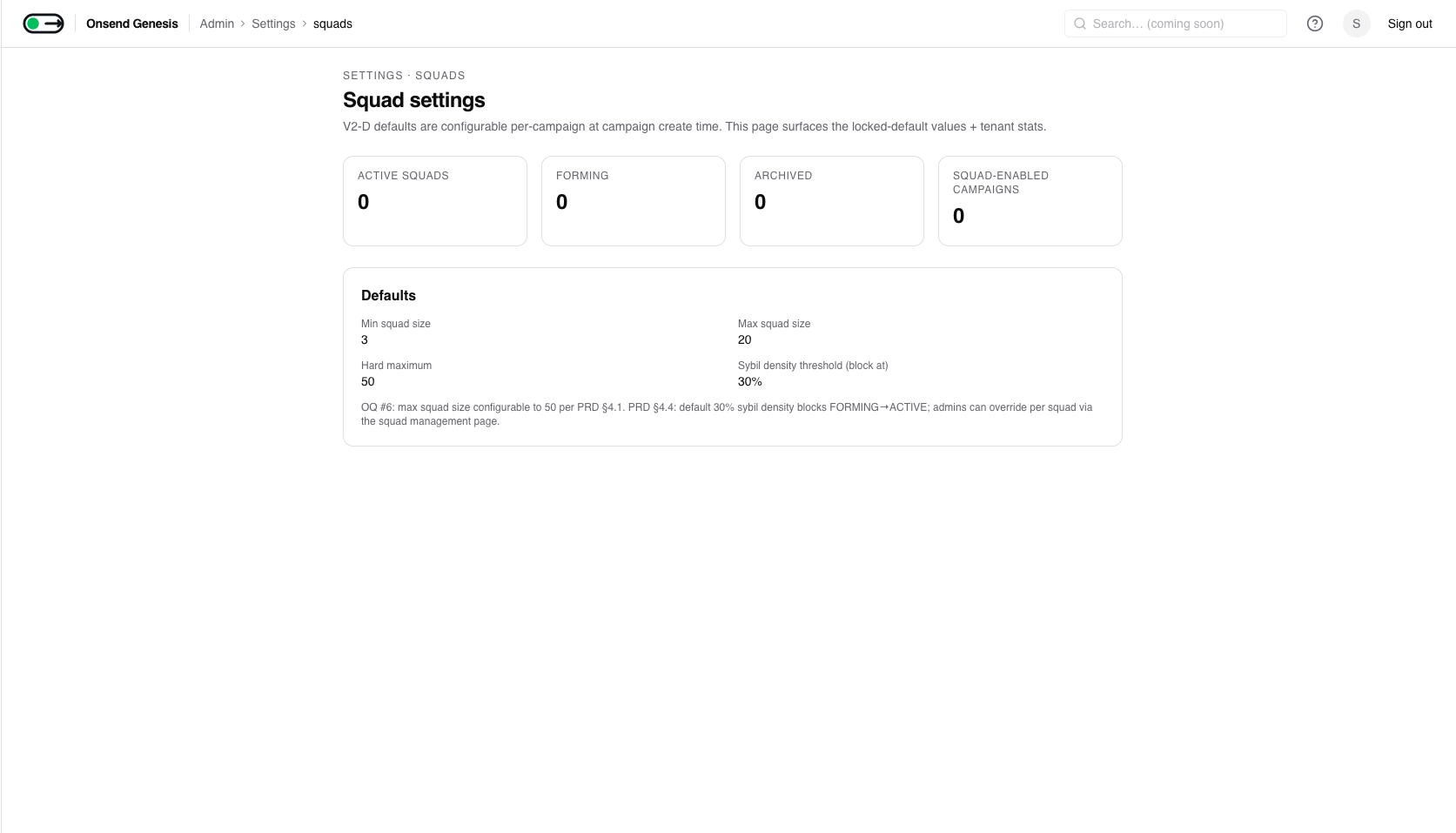
| Setting | Default | Notes |
|---|---|---|
| Minimum size | 3 | Required to promote FORMING → ACTIVE |
| Maximum size | 20 | Configurable per campaign |
| Hard maximum | 50 | The ceiling the max can be raised to |
The anti-sybil density gate
When a squad tries to go ACTIVE, Onsend checks its sybil density: the
fraction of members flagged SUSPICIOUS or BLOCKED (or otherwise blocked /
banned) out of the whole roster. If density is at or below 0.3 (30%), the
squad promotes. Above that, promotion is blocked. This stops a farmer from
spinning up a squad of sock-puppet accounts to harvest collective bonuses.
Admins can override a blocked promotion
From a squad's detail page an admin can force-promote a squad that the density check blocked, supplying a reason. The override is recorded in the audit log with the measured density. Use it when you've manually reviewed the roster and the flags are false positives.
Squad XP rollup
A daily worker sums each ACTIVE squad's member XP per window (7-day, 30-day, all-time), ranks squads against each other, and sets the squad's total XP and tier. Blocked members' XP is excluded from the rollup so a compromised member can't inflate a squad's standing.
The squad collective quest
squad_collective is a special quest connector that rewards a whole squad for
acting together. You configure:
- a referenced quest squad members must complete,
- a required member count, and
- a time window (default 24 hours, configurable from 1 to 168 hours).
When enough squad members complete the referenced quest inside the window, every qualifying member is awarded a per-member bonus. The member who triggers verification is rewarded immediately; a worker (every 15 minutes) fans the same bonus out to the other qualifying members. Blocked members never count toward the required count and never receive the bonus. The bonus is awarded as base XP, so members' personal multipliers compound on it the same as any other quest.
Reputation tiers
Separately from per-campaign tiers, Onsend computes a project-wide reputation score per member from their XP, quest activity, referrals, wallet age, on-chain history, cross-tenant signals and badges, minus any sybil penalty. The score maps to a five-rung ladder:
| Reputation tier | Score range |
|---|---|
NEWCOMER | 0–99 |
ESTABLISHED | 100–499 |
TRUSTED | 500–1,499 |
VETERAN | 1,500–4,999 |
ELITE | 5,000+ |
Reputation is what powers the Squad founder and other built-in badges, drives the optional soulbound reputation token, and can gate reputation-restricted quests. The default thresholds above are tunable per project. Reputation is a longer-horizon trust signal, distinct from the per-campaign tier a member earns by grinding a single campaign's quests.